
- v0.1.5
- Windows 11 (x64 & ARM64)
WSLPilot
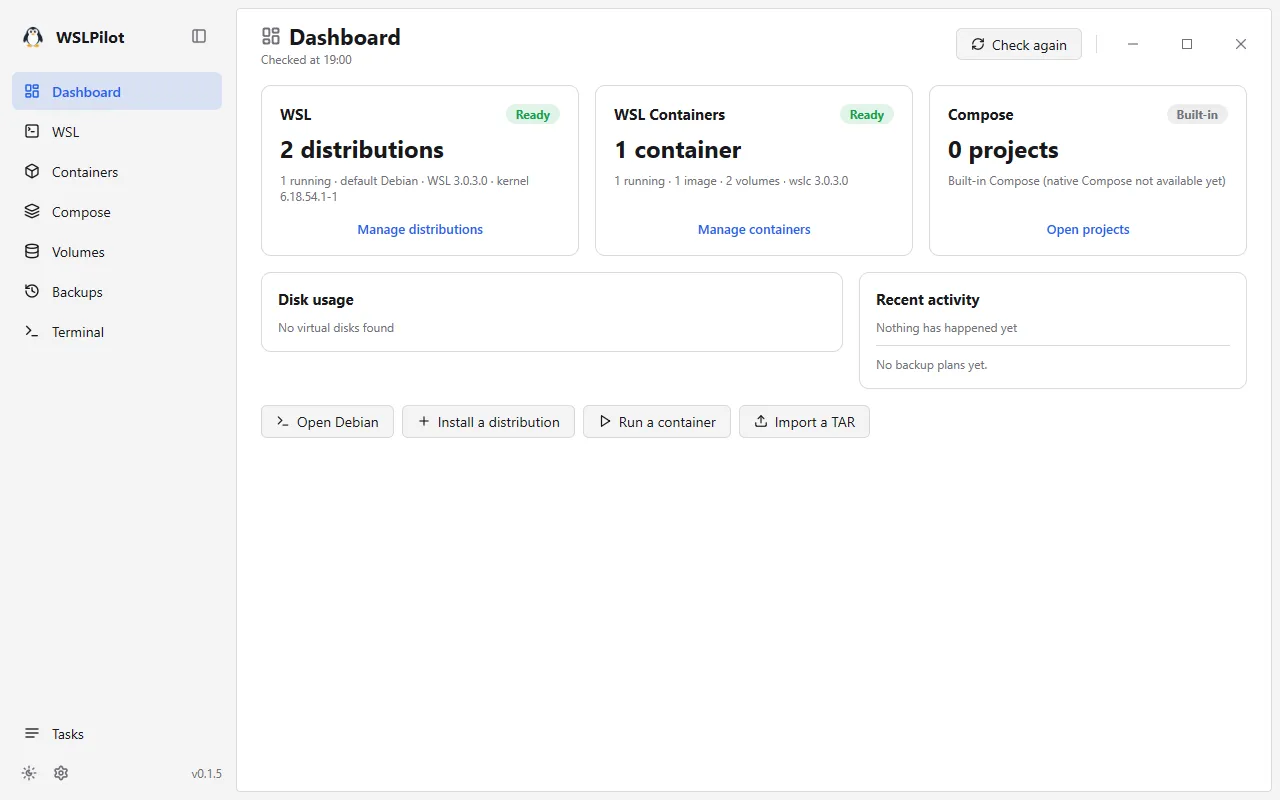
A native Windows 11 (x64 & ARM64) desktop manager for WSL distributions, virtual disk compaction, WSL Containers, Compose projects, and encrypted incremental backups.
WSLPilot brings your WSL Linux distributions, virtual disks, WSL Containers (wslc.exe in WSL 3.0+), Compose stacks, persistent volumes, and scheduled backups into one native Go + MyGo window on Windows 11 (x64 and ARM64)—with zero Docker Desktop requirement and zero hidden lock-in state, so you can keep using wsl and wslc on the command line right alongside it.
Highlights
🐧 Full WSL Distribution Lifecycle & VHDX Compaction
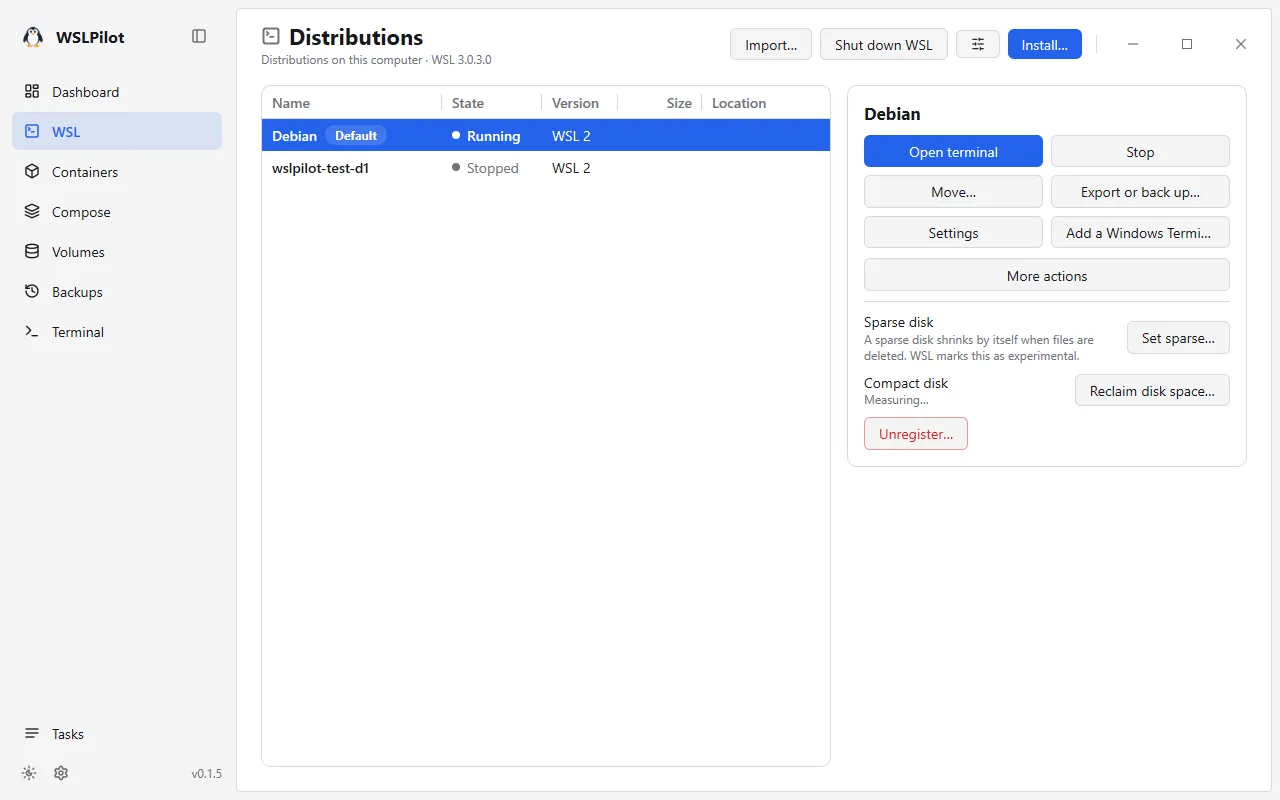
Install, import, export, start, stop, or convert distributions between WSL 1 and WSL 2; relocate a distribution to another drive; resize virtual disks; and reclaim wasted disk space by compacting bloated .vhdx virtual disks safely in place.
📝 Guided .wslconfig & wsl.conf Editing with Diff Preview
Edit global .wslconfig, per-distribution wsl.conf, and container daemon settings through clear explained forms or raw text. Only the exact keys you touch are modified, a diff preview is shown before saving, and a timestamped backup of the previous file is kept automatically.
📦 WSL Containers, Compose Stacks & Ghostty Terminal
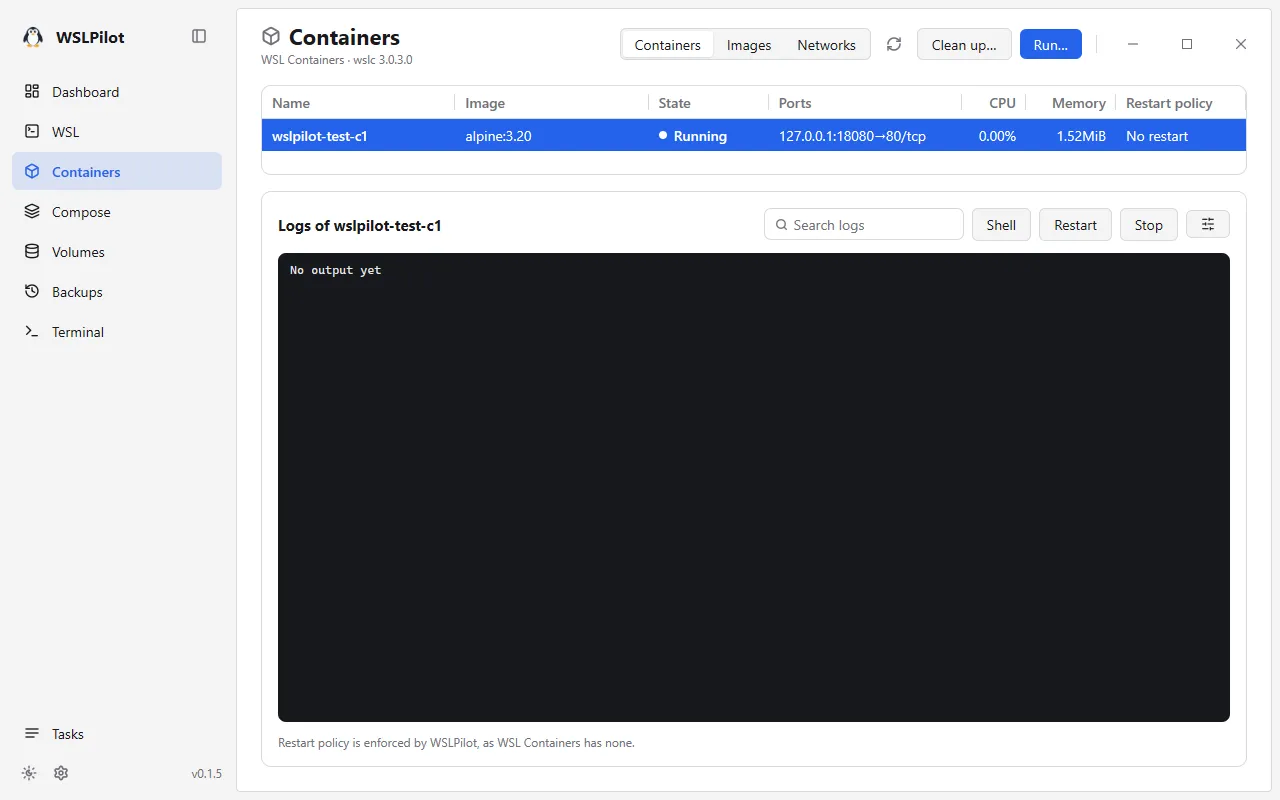
Manage containers, images, networks, logs, and Linux-permission-preserving volume .tar archives natively on WSL 3.0’s built-in WSL Containers (wslc.exe). Adds container restart policies that wslc lacks on its own, runs compose.yaml projects with explicit capability diagnostics (never silently ignoring unsupported directives), and embeds a fast terminal powered by libghostty-vt (Ghostty).
💾 Encrypted Deduplicated Incremental Backups (wpbk)
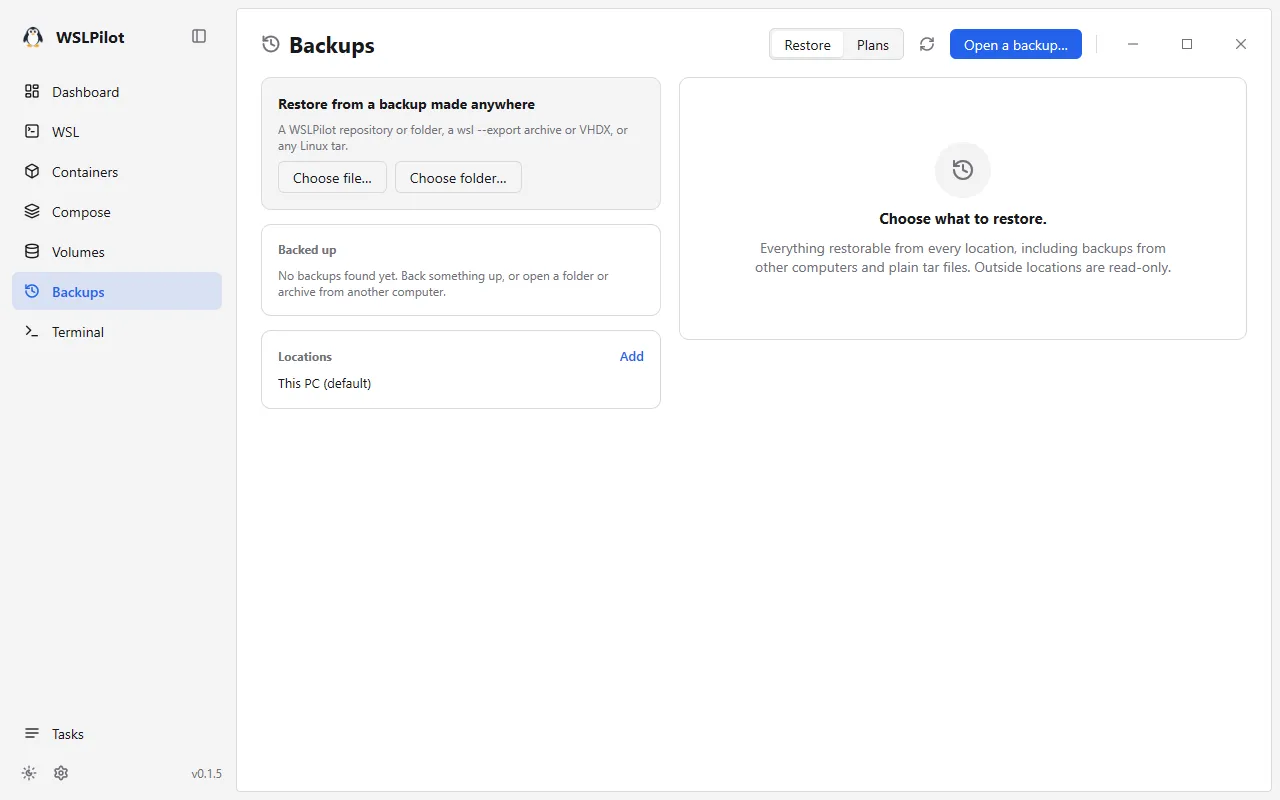
Back up distributions, volumes, and Compose projects as plain folders, portable archives, or password-encrypted blake3 + zstd deduplicated incremental repositories—complete with safety snapshots before any destructive restore, version pruning that cleanly merges retained chunks into the next version, and background scheduled backup plans while the window is closed.
Screenshots
Downloads & License

- Windows 11 (
x64& nativeARM64): Per-user auto-updating installers and portable.ziparchives on GitHub Releases - License: Released under the GNU General Public License v3.0
- v0.1.5
- Windows 11 (x64 & ARM64)
WSLPilot 介绍
无需 Docker Desktop,在单一原生窗口内管理 Windows 11(x64 / ARM64)的 WSL 发行版、虚拟磁盘瘦身、WSL Containers、Compose 项目与增量加密备份。
WSLPilot 是一款运行在 Windows 11(支持 x64 与原生 ARM64)上的原生桌面管理工具,基于 Go 与 MyGo 构建。它直接对接系统自带的 wsl.exe 与 WSL 3.0+ 内置的 wslc.exe(WSL Containers)——完全不需要安装 Docker Desktop,也不维护封闭私有状态,随时可以与命令行混用。
核心特性
🐧 WSL 发行版全生命周期管理与 .vhdx 虚拟磁盘瘦身
一站式安装、导入、导出、启停 WSL 发行版,支持 WSL 1/2 互转、跨盘迁移与磁盘扩容,并内置一键压缩回收删文件后膨胀的 WSL 2 .vhdx 虚拟磁盘空间。
📝 带差异预览的 .wslconfig 与 wsl.conf 表单编辑
将全局 .wslconfig、各发行版 wsl.conf 与容器配置呈现为附带平实说明的表单(也可直接改原文):仅触碰你实际修改的键值,保存前展示行级变更对比,并自动留存旧文件备份。
📦 原生 WSL Containers、Compose 编排与内置 Ghostty 终端
基于 WSL 3.0 原生容器引擎管理容器、镜像、网络、日志与保留 Linux 属主权限的数据卷 .tar 导入导出;补齐了原生 wslc 缺失的容器重启策略,支持直接运行 compose.yaml 编排项目并如实报告不支持项(绝不静默跳过),内置由 libghostty-vt(Ghostty)驱动的高性能终端面板。
💾 密码加密去重增量备份(wpbk)与后台计划任务
支持将发行版、数据卷与 Compose 项目备份为普通目录、单文件归档或基于 blake3 + zstd 的密码加密增量备份仓库;任何覆盖或删除恢复前都会自动先做一次安全快照,删除历史版本时无损合并数据块,关闭窗口后定时备份计划仍在后台照常执行。
界面截图
下载与开源许可
- Windows 11(
x64与原生ARM64):前往 GitHub Releases 获取免管理员当前用户安装包或便携.zip - 许可证:基于 GNU 通用公共许可证 v3.0 (GPL-3.0) 开源发布
- v0.1.5
- Windows 11 (x64 & ARM64)
WSLPilot 介紹
無須 Docker Desktop,於單一原生視窗管理 Windows 11(x64 / ARM64)的 WSL 發行版、虛擬磁碟瘦身、WSL Containers、Compose 專案與增量加密備份。
WSLPilot 是一款運行於 Windows 11(x64 與原生 ARM64)的原生桌面工具,以 Go 與 MyGo 打造。它直接串接系統內建的 wsl.exe 與 WSL 3.0+ 的 wslc.exe(WSL Containers)——無須安裝 Docker Desktop,也不綁定封閉狀態,可隨時與命令列並行使用。
核心特色
- WSL 發行版與 VHDX 磁碟壓縮:安裝、匯入匯出、啟停、跨磁碟遷移及一鍵瘦身膨脹的 WSL 2
.vhdx虛擬磁碟。 - 表單化
.wslconfig/wsl.conf編輯:附帶說明表單與儲存前差異預覽,僅改動變更行並自動保留備份。 - 原生 WSL Containers、Compose 與 Ghostty 終端機:管理容器、映像檔、保留 Linux 權限的資料卷
.tar,補齊容器自動重啟策略、執行compose.yaml並內建libghostty-vt終端機。 - 增量加密備份(
wpbk):基於blake3+zstd的密碼加密增量備份庫、覆寫前安全快照,以及關閉視窗後持續運作的排程備份。
介面截圖
下載與授權
- Windows 11(
x64與原生ARM64):於 GitHub Releases 下載安裝程式或可攜式.zip - 授權條款:GNU 通用公共授權條款 v3.0 (GPL-3.0)
- v0.1.5
- Windows 11 (x64 & ARM64)
WSLPilot の紹介
Docker Desktop 不要で WSL ディストリビューション、VHDX ディスク圧縮、WSL Containers、Compose、暗号化増分バックアップを一元管理する Windows 11(x64 / ARM64)ネイティブアプリ。
WSLPilot は、Windows 11(x64 / ネイティブ ARM64)向けの WSL・コンテナ統合管理デスクトップアプリです(Go + MyGo 製)。OS 標準の wsl.exe と WSL 3.0 以降の wslc.exe(WSL Containers)をそのまま駆動するため Docker Desktop は不要で、コマンドラインとも自由に併用できます。
主な特徴
- WSL 管理と VHDX ディスク圧縮:ディストリビューションの導入・移行・WSL 1/2 変換に加え、肥大化した
.vhdx仮想ディスクの安全なインプレース圧縮に対応。 - 差分プレビュー付き
.wslconfig/wsl.conf編集:解説付きフォームまたはテキストで編集でき、変更箇所の差分確認と自動バックアップを備えています。 - WSL Containers・Compose・内蔵 Ghostty ターミナル:
wslc単体にはない再起動ポリシーを補完し、compose.yamlプロジェクトの実行、Linux 権限を保持したボリューム.tar入出力、libghostty-vtベースの内蔵ターミナルを提供。 - 暗号化対応の重複排除・増分バックアップ(
wpbk):blake3+zstdによるパスワード保護付き増分リポジトリ、復元前の自動セーフティバックアップ、ウィンドウ閉鎖後も動くスケジュール実行に対応しています。
スクリーンショット
ダウンロードとライセンス
- Windows 11(
x64/ ネイティブARM64):GitHub Releases にてユーザー単位インストーラーおよびポータブル.zipを配布 - ライセンス:GNU General Public License v3.0