
- v0.2.4
- Windows (x64 & ARM64)
- macOS (Apple Silicon & Intel)
- Linux (x64 & ARM64)
EasyTier MyGo
A native cross-platform desktop client for EasyTier mesh networking — featuring multi-network live telemetry, three explicit privilege modes, and lossless Form/TOML editing.
EasyTier MyGo is a lightweight, native desktop client for EasyTier peer-to-peer mesh networks, written in Go on top of MyGo without WebView bloat. A dedicated local supervisor daemon runs the EasyTier core, monitors tunnel health, distinguishes local faults from upstream outages, and recovers cleanly without ever overriding your intent.
Highlights
📊 Multi-Network Dashboard & Friendly Device List
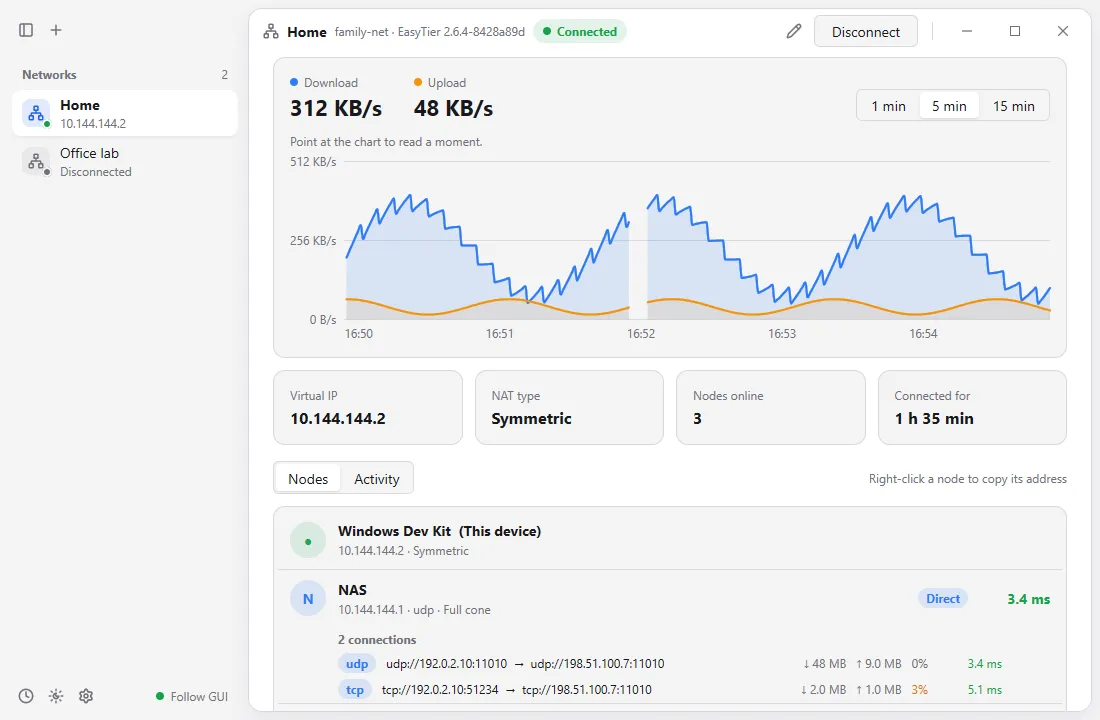
Run several EasyTier networks side by side with real-time throughput graphs, NAT types, shared subnets, and per-tunnel connection metrics. Peers read like a clean device inventory: machine hostnames are formatted automatically (macbook-pro → MacBook Pro), matched offline against 63 bundled hardware and OS vendor logos, and support one-click copying of virtual IPv4 addresses or MagicDNS names.
🔐 Three Explicit Run Modes & Animated First-Run Tour
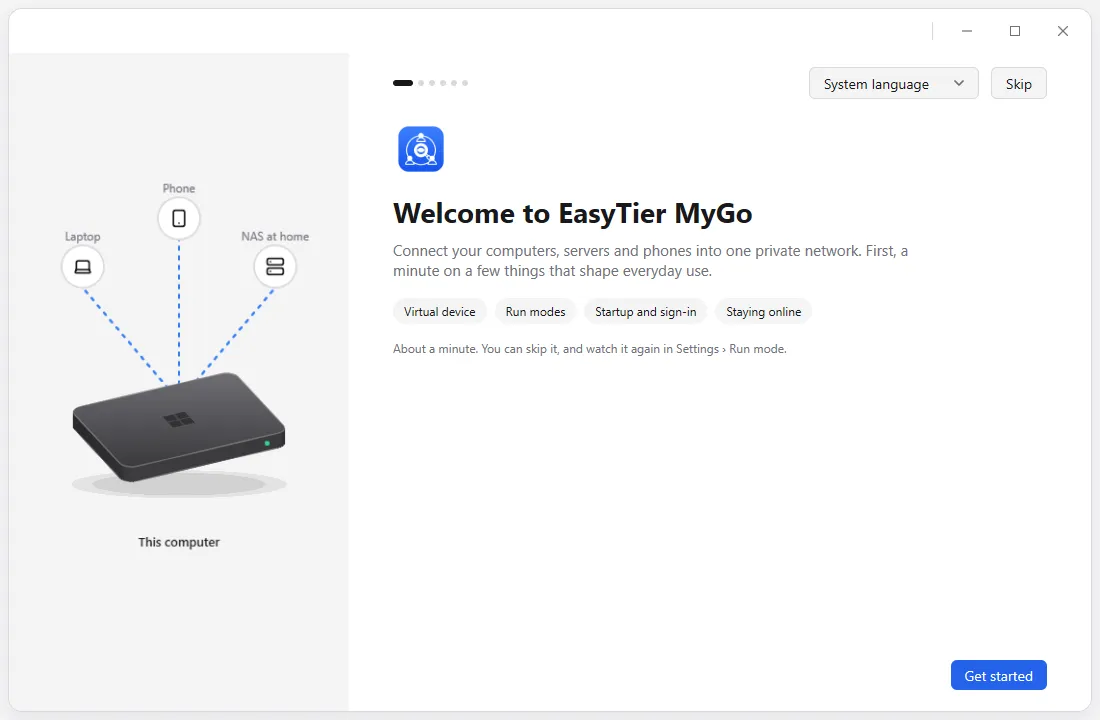
Choose how EasyTier runs on your machine—explained clearly through a six-step animated hardware tour:
- No privileges (
no_tun): Runs entirely in user space with zero administrator prompts. - Follow GUI: Virtual network adapter runs while the app is open (including in the tray).
- Background service: Networks stay connected from boot before sign-in. Administrator authorization happens at most once when installing the signed privileged helper—never when launching the app.
📝 Lossless Form ↔ Raw TOML Editor & Rollback
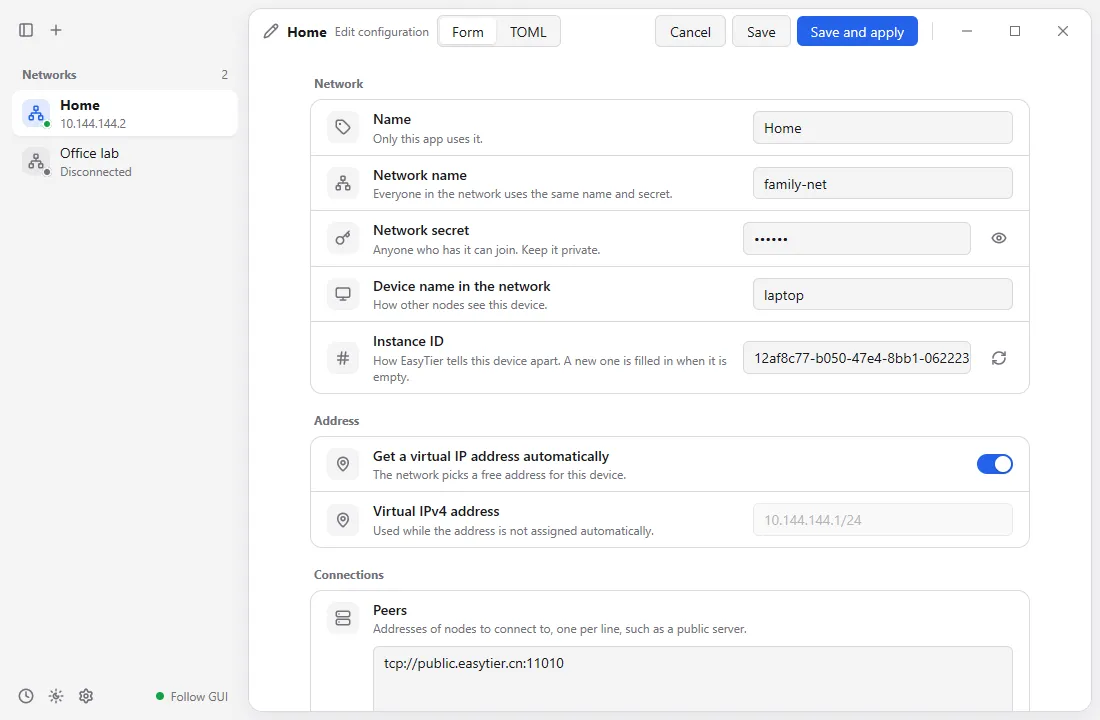
Edit networks either through a guided form (ready for EasyTier 2.6.x and 2.7.0 features) or raw TOML without losing comments or custom keys. Conflict checks, version-compatibility warnings, automatic config snapshots, and failed-apply rollback keep tunnel configurations safe.
🧩 Pluggable EasyTier Cores & Optional EasyTier mini
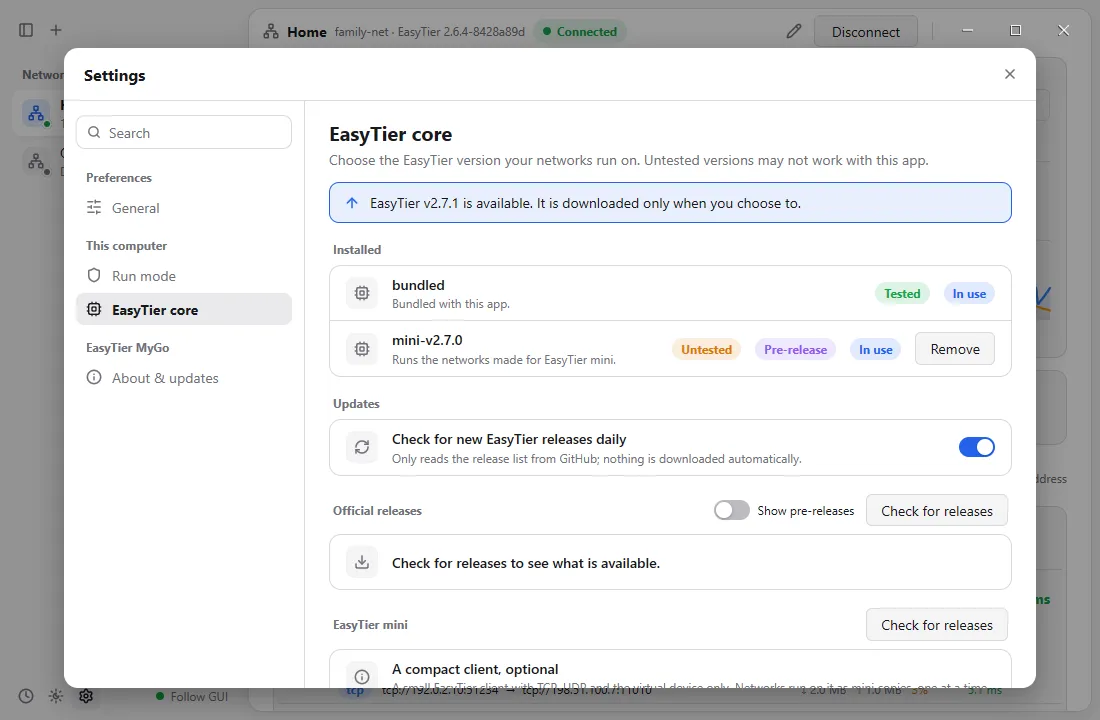
Use the bundled stable EasyTier release, download other official/prerelease versions, or point to your own custom binary (automatically unpacking UPX on fetch to cut CLI polling CPU from ~250 ms to ~3 ms)—plus one-click creation of EasyTier mini companion profiles.
Screenshots
Downloads & License

- Platforms: Windows (
x64/ARM64), macOS (Apple Silicon/IntelDMG), and Linux (x64/ARM64.deb,.tar.gz, and rootlessinstall.sh— zero WebKitGTK dependency) - License: Released under GNU General Public License v3.0 (bundled EasyTier core under LGPL-3.0)
- v0.2.4
- Windows (x64 & ARM64)
- macOS (Apple Silicon & Intel)
- Linux (x64 & ARM64)
EasyTier MyGo 介绍
跨平台原生 EasyTier 异地组网桌面客户端:支持多网络实时仪表盘、三种显式运行权限模式与表单/TOML 无损编辑。
EasyTier MyGo 是一款基于 Go 与 MyGo 构建的跨平台原生 EasyTier 桌面客户端,告别厚重的 WebView 套壳。独立的本地监管守护进程负责托管 EasyTier 内核、持续监测健康度、区分本机故障与外部断网,并在不违背用户意愿的前提下执行有界故障自愈。
核心特性
📊 多网络并排仪表盘与设备化节点列表
支持同时运行多个 EasyTier 网络,实时展示上下行速率曲线、NAT 类型、共享子网及每条底层连接(UDP/TCP/KCP/QUIC)的丢包与延迟。节点列表像设备清单一样直观:自动美化机器名(如 macbook-pro → MacBook Pro),离线匹配内置的 63 款硬件与系统厂商图标,支持悬停或右键一键复制虚拟 IP、主机名与 MagicDNS 域名。
🔐 三种显式运行方式与六步硬件动画引导
首次运行通过六步等轴测硬件动画引导清晰解释每一种模式的含义:
- 免授权模式(
no_tun):纯用户态运行,全程零管理员弹窗; - 随界面运行:应用(含最小化到托盘期间)运行时保持虚拟网卡组网;
- 后台服务模式:开机登录前即保持常驻在线。 特权助手仅在首次安装时请求一次管理员授权,日常启动与签名自更新均不再弹窗。
📝 表单 ↔ TOML 双向无损编辑与自动回滚
可在带逐行说明的可视化表单(已兼容 EasyTier 2.6 与 2.7 新特性提示)和原生 TOML 源码之间无损切换,自动检测端口/网段冲突、保留配置快照并在应用失败时安全回滚。
🧩 多版本内核自由切换与可选 EasyTier mini
可使用内置稳定版内核、在设置中按需下载其他官方/预发布版本(自动解包 UPX,将每次状态轮询开销从约 250 ms 降至 3 ms)或指定自编译内核,还支持一键生成兼容 EasyTier mini 精简内核的网络副本。
界面截图
下载与开源许可
- 支持平台:Windows(
x64/ARM64)、macOS(Apple Silicon/IntelDMG,支持关窗自动隐藏程序坞图标)、Linux(x64/ARM64.deb、.tar.gz与免 rootinstall.sh,无需 WebKitGTK 依赖) - 许可证:基于 GNU 通用公共许可证 v3.0 (GPL-3.0) 发布(随附的 EasyTier 内核遵循 LGPL-3.0)
- v0.2.4
- Windows (x64 & ARM64)
- macOS (Apple Silicon & Intel)
- Linux (x64 & ARM64)
EasyTier MyGo 介紹
跨平台原生 EasyTier 異地組網桌面客戶端:支援多網路即時儀表板、三種明確權限執行模式與表單/TOML 無損編輯。
EasyTier MyGo 是一款以 Go 與 MyGo 打造的跨平台原生 EasyTier 桌面客戶端,不依賴肥大的 WebView。內建輕量守護行程負責監控核心健康狀態、區分本機異常與網路中斷,並執行有界自動恢復。
核心特色
📊 多網路即時流量儀表板與裝置化節點清單
並排管理多個 EasyTier 網路,即時呈現流量曲線、NAT 類型與連線延遲;自動美化主機名稱並離線配對內建 63 款硬體與系統廠商標誌,一鍵複製虛擬 IP 或 MagicDNS 名稱。
🔐 三種執行模式與六步硬體插畫導覽
提供 免授權(no_tun)、隨介面執行 與 背景服務 三種模式,首次啟動以六步硬體動畫清楚說明差異;特權助手僅於初次安裝時要求一次管理員授權,後續簽章更新無須重複彈窗。
📝 表單 ↔ TOML 無損編輯與多核心管理
支援表單與原始 TOML 雙向無損切換、版本相容提示與失敗自動回滾;可自由切換內建核心、下載官方其他版本或啟用選配的 EasyTier mini 副本。
介面截圖
下載與授權
- 支援平台:Windows(
x64/ARM64)、macOS(Apple Silicon/IntelDMG)、Linux(x64/ARM64.deb、.tar.gz與免 rootinstall.sh) - 授權條款:GPL-3.0(內附 EasyTier 核心為 LGPL-3.0)
- v0.2.4
- Windows (x64 & ARM64)
- macOS (Apple Silicon & Intel)
- Linux (x64 & ARM64)
EasyTier MyGo の紹介
マルチネットワークのライブ統計、3つの明快な権限実行モード、ロスレスなフォーム/TOML 編集を備えたクロスプラットフォーム EasyTier ネイティブクライアント。
EasyTier MyGo は、Go と MyGo で構築された EasyTier 向けの軽量ネイティブデスクトップクライアントです。WebView を使わず、バックグラウンドの監視デーモンが EasyTier コアのヘルスチェックと局所障害からの自動復旧を担います。
主な特徴
📊 マルチネットワークダッシュボードとベンダロゴ付きノード一覧
複数の EasyTier ネットワークを並べて管理し、リアルタイム通信量グラフ、NAT 種別、共有サブネットを表示。ノード一覧はホスト名を整形表示(macbook-pro → MacBook Pro)し、内蔵された 63種のメーカー・OS ロゴ をオフラインで自動マッチ。ワンクリックで仮想 IP や MagicDNS 名をコピーできます。
🔐 3つの実行モードとアニメーション付き初回ツアー
初回起動時の6ステップのイラスト付きガイドで、権限不要(no_tun)・GUI 連動・バックグラウンドサービス の違いを分かりやすく案内。特権ヘルパーの管理者承認は初回導入時の1回のみで、署名付きアップデート時にも再承認は不要です。
📝 フォーム ↔ TOML ロスレス編集とコア切り替え
ガイド付きフォームと生 TOML をコメントや独自キーを失わずに行き来でき、競合検査と自動ロールバックに対応。同梱安定版のほか公式リリースの追加ダウンロード(UPX 自動展開で CLI 負荷を約 250 ms → 3 ms に削減)、カスタムバイナリ指定、オプションの EasyTier mini プロファイル作成にも対応しています。
スクリーンショット
ダウンロードとライセンス
- 対応環境:Windows(
x64/ARM64)、macOS(Apple Silicon/IntelDMG)、Linux(x64/ARM64.deb/.tar.gz/install.sh、WebKitGTK 不要) - ライセンス:GNU General Public License v3.0(同梱 EasyTier バイナリは LGPL-3.0)